How to Create a Consistent Visual Brand Identity With AI
A recognizable visual identity helps people identify your work before they read the account name. Yet creators and small businesses often publish a different-looking image every week: one post uses muted photography, another uses glossy illustrations, and a third relies on a fashionable template. An ai image generator can make producing visuals easier, but consistency still requires deliberate rules.

You do not need a professional studio or an elaborate branding manual. You need a small visual system that can guide website images, social posts, newsletter graphics and campaign materials. The goal is not to make every image identical. It is to make different images feel as though they belong to the same brand.
Start with what the brand should communicate
Before choosing colors or generating images, write down three qualities the brand should convey. A personal finance educator might choose clear, reassuring and practical. An independent travel writer might choose curious, warm and documentary. These words are useful only when they influence visible decisions.
Translate each quality into something you can check. “Clear” might mean uncluttered backgrounds and one focal point. “Warm” might mean natural light and restrained earth tones. “Documentary” might mean authentic photographs rather than invented scenes presented as real places.
Then identify your recurring content formats. A creator may need blog headers, square social images, vertical story graphics and email banners. Knowing the formats in advance prevents a style that looks attractive in one layout but fails everywhere else.
Build a one-page visual style guide
Start with five components:
Color palette: Choose two or three main colors and a small set of supporting neutrals. Record color codes so future graphics match.
Typography: Select a headline and body typeface that are readable and licensed for your intended use. Keep actual text editable in a design tool.
Composition: Decide where subjects normally sit, how much empty space to leave and where headlines or logos appear.
Image treatment: Define lighting, texture, contrast, camera angle or illustration style. “Soft daylight, realistic surfaces, low saturation” is more actionable than “premium.”
Brand boundaries: List what should not appear, such as exaggerated product proportions, misleading locations, heavily retouched faces or unreadable decorative text.
Put two or three examples beside these rules. A guide is most useful when someone can compare a new image with approved references rather than interpret abstract adjectives.
Create a repeatable AI image prompt
A reusable prompt should describe a visual system, not just a subject. Try this starting structure:
“Create an editorial image of [subject] for [audience and use]. Use [lighting], [color palette], [camera angle or illustration treatment], and [background]. Place the focal subject [position] with [amount of negative space] for an editable headline. Avoid [unwanted elements].”
For example: “Create an editorial still life of a notebook and ceramic mug for a creator newsletter. Use soft morning window light, warm cream and muted olive colors, natural materials, a slightly overhead view, and generous empty space on the left. Avoid logos, visible text and clutter.”
Reuse the same style instructions across different subjects, then adjust the content-specific details. In Dreamina, creators can explore candidate images with this kind of brief and compare the outputs against their visual guide. Repeating a prompt does not guarantee identical results; review each image for drift.
Test the system across three formats
Before committing to a style, create one website header, one social post and one newsletter graphic. Use different subjects but the same visual rules. Place them side by side.
Ask whether the palette still feels consistent, whether the subject is recognizable at mobile size and whether there is enough space for real text. An image may look impressive at full resolution but become confusing in a narrow feed.
Do not bake essential captions, prices or product claims into generated imagery. Add those elements afterward in an editable design layout so they remain accurate, accessible and easy to update.
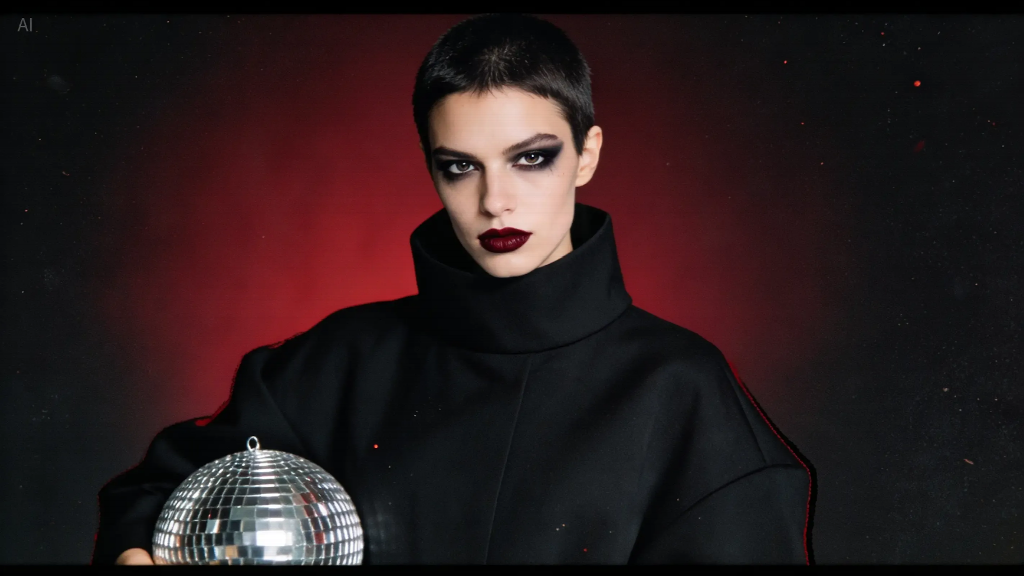
The existing editorial illustration can serve as a reference for checking whether texture, color and composition align with the wider visual system.
Use real photographs where authenticity matters
AI imagery can communicate an abstract idea or illustrate a fictional scene, but it should not replace evidence. Use actual photographs for product details, personal portraits, event coverage, venue interiors and other situations where viewers reasonably expect to see something real.
A food blogger can use a stylized illustration for an essay about seasonal cooking, while photographs of the recipe itself should accurately represent the dish. A local business can use an abstract header image, but its storefront and team should be shown truthfully.
If a generated visual could be mistaken for documentary material, label or contextualize it appropriately. Confirm permissions for source photos and follow applicable platform rules and disclosure requirements.
Avoid the five most common consistency mistakes
Changing style with every trend: A popular aesthetic may attract attention briefly but can make a brand difficult to recognize. Experiment within the palette and composition rules instead.
Writing vague prompts: Words like “beautiful” or “professional” leave too much open to interpretation. Specify the lighting, framing, materials and intended placement.
Treating AI output as final artwork: Inspect hands, faces, object shapes, text and small details. Add typography and branding with editable tools.
Making every post look identical: Consistency is not repetition. Vary subject matter and layouts while keeping a few recognizable characteristics.
Ignoring the publishing context: A cinematic landscape might work as a blog header but fail as a thumbnail. Check the image at its actual display size.
Build a lightweight production workflow
A reliable process has five stages. First, choose the content goal and final dimensions. Second, select an approved reference and adapt the reusable prompt. Third, generate a small number of candidate images using a free ai image generator or another appropriate tool. Fourth, check the best candidate against the style guide and correct or replace weak details. Fifth, add editable text, export for the platform and save the final file with its prompt and approval notes.
Keep a simple library with folders for approved images, reference styles and reusable templates. Record which colors, crops and compositions work in each channel. This saves time when the same campaign needs multiple formats.
For collaborative teams, designate one person to approve departures from the guide. Otherwise, individual contributors may each make reasonable decisions that add up to an inconsistent visual identity.
Measure recognition, not just visual polish
A cohesive look should help people understand and recognize your content. Track practical signals such as thumbnail click-through rate, engagement on recurring formats, newsletter visits and feedback about clarity. Compare similar posts over time rather than attributing every performance change to the imagery.
You can also run a small recognition check: show several unbranded graphics to a few people familiar with the account and ask which belong together. If they cannot identify a common style, the rules may be too loose or inconsistently applied.
Do not overinterpret a single post. Topic, timing, distribution and audience interest also influence performance. Use the feedback to refine one element at a time.
A simple four-week rollout
Week one: Audit existing images and choose three brand qualities, a palette and two reference examples.
Week two: Write a style guide and reusable prompts. Create sample images for three publishing formats.
Week three: Publish a small batch, using real photographs when accuracy matters and generated illustrations where appropriate.
Week four: Review the visuals together, check performance and update any rules that are hard to follow consistently.
The strongest visual identity is not the most elaborate one. It is a system that creators can maintain without losing their individual point of view. AI can speed up exploration, but deliberate choices about imagery, typography, truthfulness and repetition are what make the result recognizable.